Ubuntu Karmic Tip: Change Gnome Language Indicator to Flag Icons
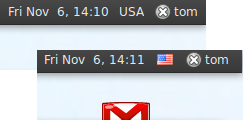 There is a long time debate in the Gnome and Ubuntu community about the use of national flags as language indicators instead of country codes.
The basic argument is that for many languages there are several nationalities that use them, and that using flags as indicators might hurt the feelings of just annoy people (What do you use for English? American flag? UK flag? Maybe Australian flag? etc.).
Further more, in the past there were incidents with the use of some controversial flags that pissed of other nationalities (I'm sure there is a link for that somewhere, can't find it), so eventually the use of flags as indicators was abandoned.
But what if you don't care about all this dispute and just want the freedom to use nice icons instead of plain text? There is a fairly simple solution:
The solution is based on this forum post: https://www.linuxquestions.org/questions/ubuntu-63/keyboad-indicator-icons-575083/ , this technique should work on all Ubuntu versions from Feisty to Karmic.
Step 1:
Goto https://www.famfamfam.com/lab/icons/flags/ download the free flags package and extract the /png directory (I will use ~/Downloads/ in this example)
Step 2:
Copy or move the contents of this directory to /usr/share/pixmaps (I read that ~/.icons/flags might work too, haven't tried it):
sudo mv ~/Downloads/png/* /usr/share/pixmaps/
Step 3:
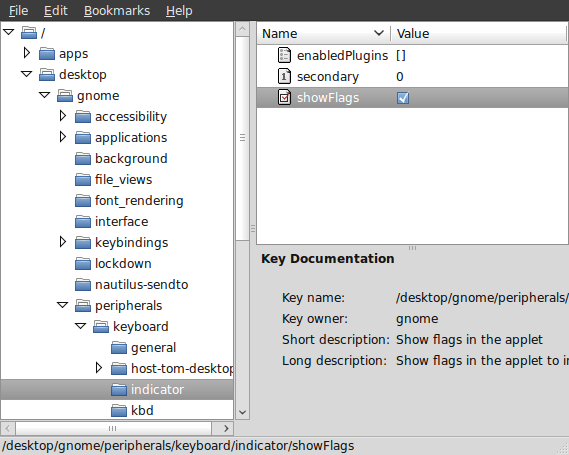
From the menu launch Applications -> System Tools -> Configuration Editor, and drill down to desktop -> gnome -> peripherals -> keyboard -> indicator.
Check the useFlags checkbox, your language indicator will immediately change from text to the corresponding flag.