Mac OS X - Hebrerw/English keyboard layout switch with CapsLock
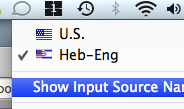 I bought myself a new MacBook Pro this week (So much fun!) and I wanted to have the same keyboard layout switch I had on my Ubuntu machine - Using CapsLock, which is useless otherwise.
After googeling around I found 2 relevant results -
The first is this post - https://hellomacworld.blogspot.com/2007/12/hebrew-keyboard-layout.html
By a guy who created a keyboard layout for the mac where shift+<key> prints out an English Capital letter (like everywhere else but OSX, I never understood this choice by Apple)
The second is an application called Ukelele that is a really good keyboard layout editing software for Macs.
I then created a keyboard layout that combines both needs -
When CapsLock is off, The layout is Hebrew, and with shift+<key> you get English Capitals (Changed only the letters, everything else is like the Hebrew layout)
When CapsLock on - The layout is the standard English US layout.
All other Modifier keys layouts, like command+<key>, option+<key> etc. are like in the Hebrew layout (for Nikud for example).
You can Download the layout from here (OS X 10.2 and up) - Heb-Eng.zip
To use it:
1. Extract the .zip to /Users/[your user name]/Library/Keyboard Layouts.
2. Log off and back on (else the layout won't work)
3. Go to International in System Preferences and select the "Heb/Eng" Layout (It has a half US half Israel flag icon)
4. Thats it, Switch to the layout and use CapsLock to switch languages, when the light if off you are in Hebrew mode, when on in English mode.
* One drawback - In non-native apps (like Firefox) the cursor direction will always be the hebrew cursor - pointing to the left.
2026 Update
Found the original post in Archive.org - https://hellomacworld.blogspot.com/2007/12/hebrew-keyboard-layout.html
Surpisingly, the Ukelele link is still active :)